


When I Work Key Facts
What is When I Work?
When I Work is employee scheduling software for hourly, shift-based teams. A manager builds the week’s schedule, tracks hours against it and messages staff from one mobile app. Shift swaps and time-off requests stop running through personal phones and group texts.
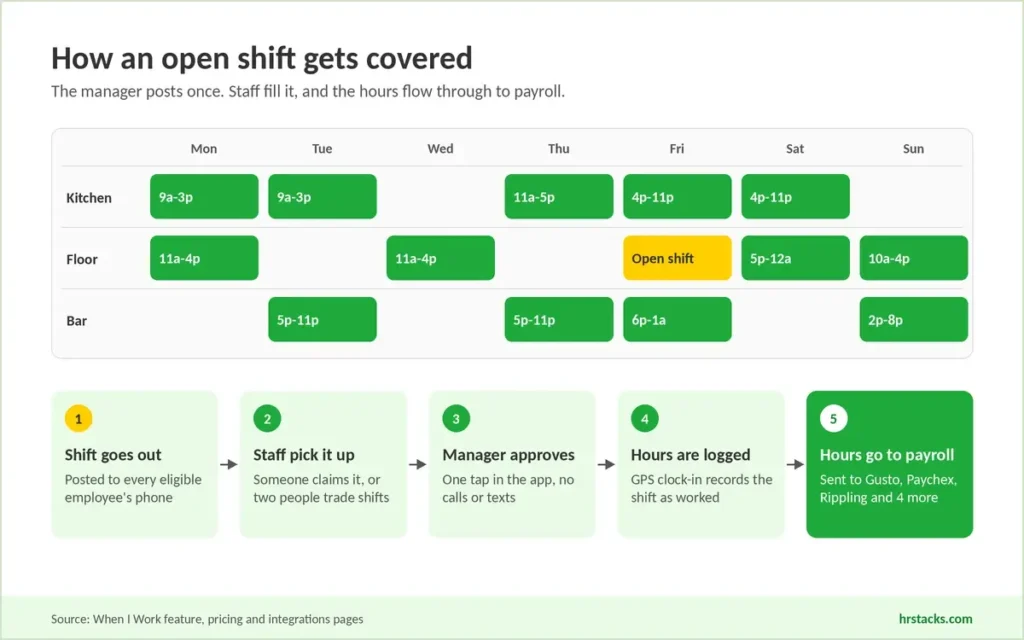
The scheduler is the core. Auto scheduling fills shifts from availability and labor targets, and employees claim open shifts or trade with each other for one-tap approval. The built-in time clock records punches with GPS and geofencing, then sends approved hours to seven payroll providers, including Gusto, QuickBooks Online and Rippling.
Around that core sit labor forecasts, standard labor reports and, on the multi-location plan, labor sharing and custom reporting. It fits restaurants, retail stores and clinics that run standard shifts. Teams that need employee records, built-in payroll or deep labor analytics will outgrow it and should compare full HR software.
Editor’s Verdict on When I Work
When I Work is a low-cost way for a single-site hourly team to put the schedule, a time clock and staff chat in one app for $2.50 per user. The fit ends where you need labor analytics by department, HR records or built-in payroll.
Users rate it 4.5 because daily scheduling feels easy, while we weigh the basic reporting, the reliability complaints after updates and a payroll list that skips ADP.
When I Work Pros and Cons
The biggest strength is adoption: employees use the app to swap shifts and clock in without managers chasing them. The biggest weakness is reporting, which stops at standard labor reports unless you pay $5 per user. For a single-site team that mainly needs a working schedule, that trade is easy to accept.
Strengths
- Staff handle their own swapsEmployees drop, pick up and trade shifts in the app, and scheduling features draw 91% positive mentions in recent public reviews.
- Time clock in base priceBoth plans include GPS clock-in, geofencing and timesheets, so $2.50 per user covers scheduling and attendance with no separate module.
- No contract, cancel anytimeMonthly billing with no contract, a 14-day trial without a card, and seats you can add or reduce as headcount shifts.
- Seven payroll connectionsApproved hours flow to Gusto, QuickBooks Online, Paychex, OnPay, Square Payroll, Simplepay.ca and Rippling, which adds six free months for new customers.
Limitations
- Reporting stays basicSingle-location accounts get standard labor reports only. Custom reports need the $5 plan, and reviewers still export to spreadsheets for department labor cost.Alternative: Deputy, Analytics+ reporting add-on at $1.50 per user
- Glitches after app updatesReliability is the most negative theme in recent reviews, with crashes, slow loading and lost data reported, often right after an update.Alternative: Homebase, Essentials at $30 per location with unlimited staff
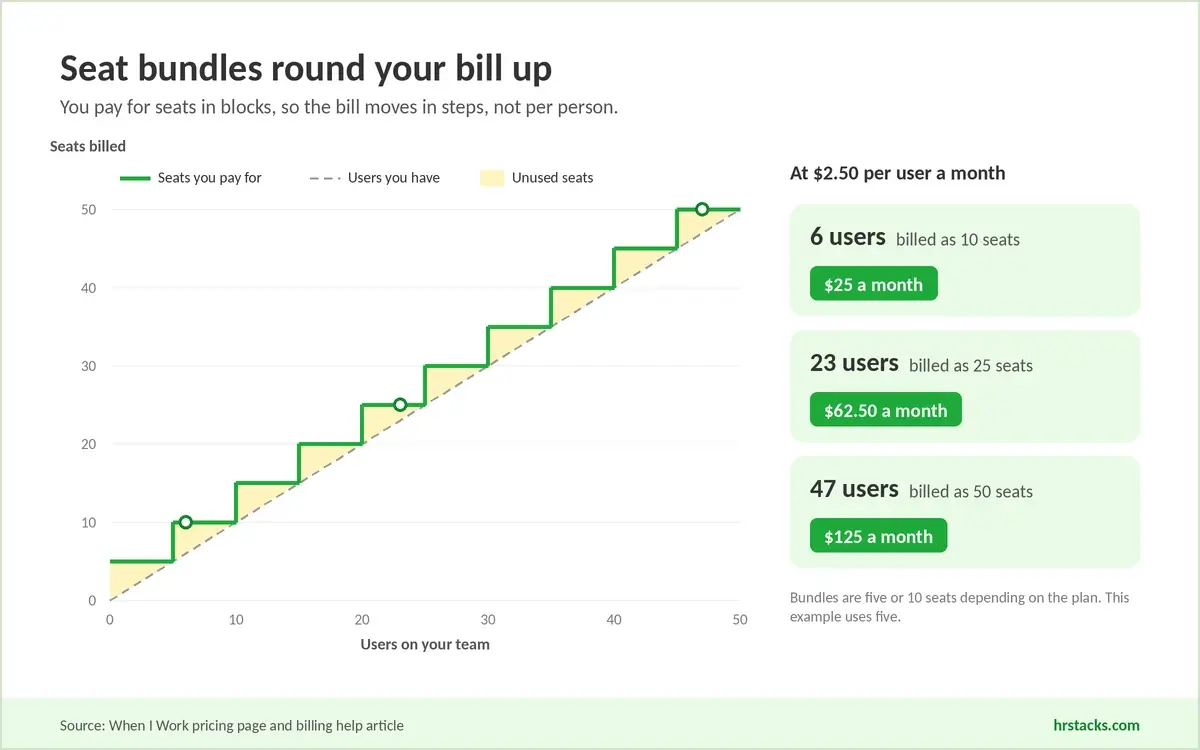
- No free planBilling starts at user one in bundles of five or 10 seats, so a 6-person team pays for 10 seats.Alternative: Connecteam, free for up to 10 users
When I Work Features
When I Work keeps a narrow feature set built around the schedule. Scheduling and labor forecasting are the strongest parts, while reporting and integrations stop earlier than Deputy or Homebase.
Core features
- Auto schedulingBuilds the week from availability, roles and labor targets, then lets you adjust before publishing to staff.Strong
- Open shifts and swapsEmployees claim open shifts, trade with coworkers and request time off, with managers approving each change in one tap.Strong
- Labor forecastingCompares scheduled hours with sales and labor budgets before you publish, so overtime shows while you can still fix it.Strong
- Time clockGPS and geofenced punches plus timesheets. Biometric clock-in is not listed, while Deputy includes it on its $6.50 Core plan.Adequate
- Team messagingOne-to-one and group chat without sharing phone numbers. Delayed or missed alerts are a repeat complaint in reviews.Adequate
Extras
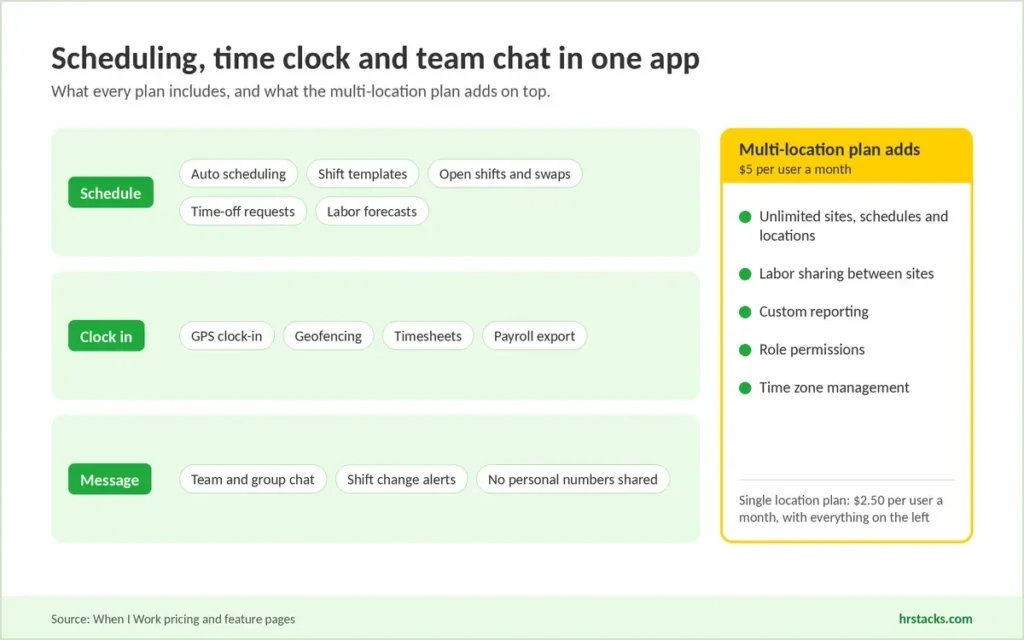
- Multi-location managementThe $5 plan covers unlimited job sites, schedules and locations, with labor sharing between departments and sites.Strong
- Payroll and POS integrationsSeven payroll connectors plus POS links, but no ADP connector, and a recent review reports QuickBooks export breaking.Adequate
- ReportingStandard labor reports and forecasts only on the $2.50 plan, with custom reporting reserved for multi-location accounts.Limited
When I Work Integrations
The payroll list is the main reason teams shortlist When I Work. Seven payroll connectors cover the common small-business stacks, but there is no ADP option, and a recent reviewer reports automatic QuickBooks export stopping after an update.
 Gusto
Gusto- QuickBooks Online
- Square Payroll
- Paychex
- OnPay
- Simplepay.ca
- Rippling
- GoCo
- People HR
- Zapier
- ResaleAI
- When I Work API
When I Work Pricing
When I Work publishes both plans and both per-user prices, with the time clock and messaging included in each. It does not publish the annual discount, an exit export policy or a price change notice period. Seat bundles of five or 10 are the cost line most buyers miss.
Published plans
Billed per user seat, monthly or annually, in bundles of five or 10 seats.
Fees and contract terms
What When I Work states publicly, and what to get in writing before you sign.
What 50 users cost a year
At one location, When I Work costs half of Deputy but well above per-location and flat-fee tools.
Who Should Use When I Work?
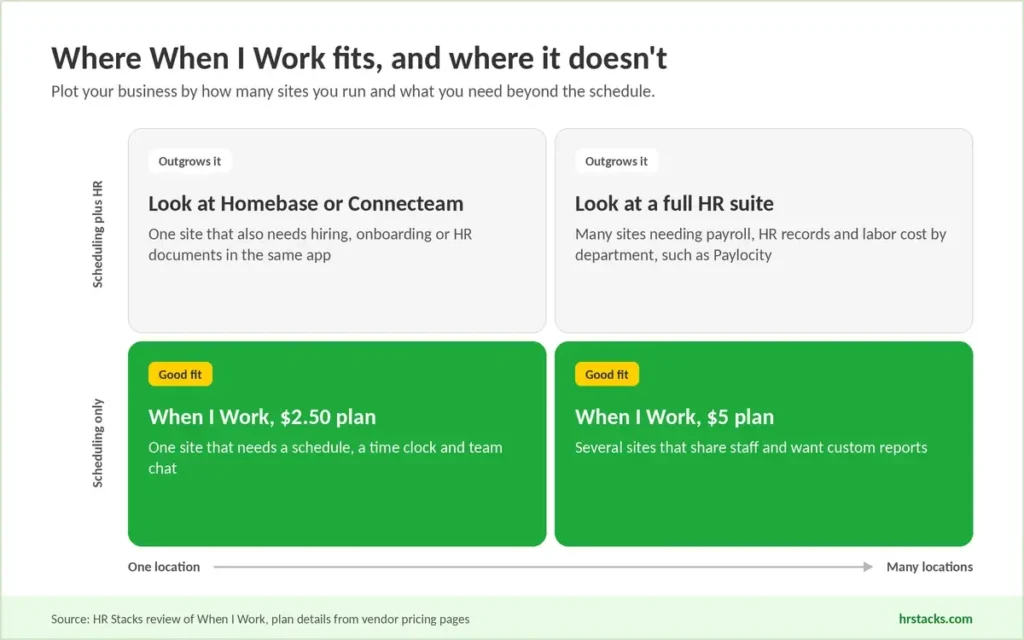
When I Work fits operators whose main problem is building and filling the schedule. It stops fitting once the business needs labor analytics, HR tools or a plan that costs nothing.
Best for
- Restaurants, cafes and shops on one site with 10 to 60 hourly staff on standard shifts.
- Owners replacing paper rotas or group chats who need staff to adopt an app with little training.
- Teams already paying through Gusto, QuickBooks Online, Paychex, OnPay or Rippling who want hours sent to payroll.
- Franchise and multi-site operators who move staff between locations and can pay $5 per user.
Skip if
- Regional managers expect labor cost broken down by department, position or location every week.Consider Paylocity, full HR suite with labor analytics, priced by quote
- You run one location with 10 or fewer staff and want scheduling at zero cost.Consider Homebase, free Basic plan for one site and 10 employees
- You also need hiring, onboarding and HR documents inside the same app as the schedule.Consider Connecteam, HR and Skills hub from $29 a month for 30 users
When I Work Alternatives
Buyers usually weigh When I Work against Deputy, which also charges per user, and two tools priced per location or per hub. Paylocity enters the shortlist when a business is ready to move scheduling into a full HR and payroll suite.
When I Work vs HomebaseCheaper for one big site, pricier across many
Choose Homebase if you run one location with more than 12 staff, where a flat $30 beats per-user billing. Read our Homebase review
When I Work vs DeputyTwice the price, deeper compliance and forecasting
Choose Deputy if you need biometric clock-in, demand forecasting or labor law compliance tools. Read our Deputy review
When I Work vs ConnecteamCheaper at scale, built for field crews
Choose Connecteam if your crews work in the field and need checklists and forms alongside the schedule. Read our Connecteam review
When I Work vs PaylocityFull HR suite for teams outgrowing point tools
Choose Paylocity if you want payroll, benefits and scheduling on one record and can absorb an implementation project. Read our Paylocity review
What Users Say About When I Work
Public reviews are positive and consistent: 1,710 reviews average 4.5, with scheduling and ease of use carrying the score. Complaints concentrate on reliability after updates and on notifications, which matter more as headcount grows.
What users praise
- Staff manage their own shiftsEmployees drop, pick up and trade shifts without a manager stepping in, the most praised workflow.
- Quick to learnReviewers describe nontechnical staff scheduling and clocking in with little or no formal training.
- Fair price per seatSmall teams call it affordable and like flexing seats up or down monthly with headcount.
- Schedules on every phoneMobile access lets staff check shifts and request time off anywhere, cutting schedule confusion.
What users complain about
- Glitches after updatesCrashes, slow loading and lost data, often following app updates, disrupt scheduling and payroll prep.
- Unreliable notificationsShift change alerts arrive late or not at all, while some staff get too many emails.
- Reports hard to readTime reports are hard to interpret and lack the filters needed for deeper labor analysis.
- Slow email supportChat help is praised, but email replies and billing follow-ups can take too long.
Is When I Work Worth It?
Yes, if you run standard shifts at one or a few sites and want scheduling, a time clock and staff chat for $2.50 per user. No, if leadership expects labor cost by department, your payroll runs on ADP, or you need HR tools in the same app.
Before committing to an annual plan, get the annual rate in writing and check how seat bundles round your headcount. Test the payroll export with your own provider during the 14-day trial.
Confirm these before you buy
None of them appear on When I Work’s pricing page.
- Annual billing rateGet the exact annual price, since the pricing page lists only monthly per-user rates.
- Seat bundle sizeConfirm whether your account bills in bundles of five or 10 seats at your headcount.
- Payroll sync directionAsk whether hours push one way or sync both ways with your payroll provider.
- Data export on exitRequest the format and timeframe for exporting timesheets and schedules if you cancel.
- Price change noticeAsk how many days’ notice you get before a per-user price increase applies.
When I Work: Common Questions
These are the questions buyers ask most before choosing When I Work, drawn from search queries and public reviews. Pricing and billing answers reflect the vendor’s own pages as checked in October 2026.
How much does When I Work cost?
When I Work costs $2.50 per user per month for a single location or schedule and $5 per user per month for multiple locations or schedules. Both plans include scheduling, time tracking and team messaging.
Is time tracking included in the price?
Yes. Both current plans include the time clock, attendance tracking and timesheets, so there is no separate time and attendance fee.
Does When I Work have a free plan?
No. There is a 14-day free trial with full access and no credit card required.
For a permanent free option, Homebase is free for one location with up to 10 employees, and Connecteam is free for up to 10 users.
How does When I Work billing work?
You pay per user seat, monthly or annually, by Visa, Mastercard or American Express. Seats are billed in bundles of five or 10, so 23 users are billed as 25 seats on a five-seat plan.
Is there a contract or cancellation fee?
No contract is required. You can switch plans, add or remove seats, or cancel at any time, and When I Work says there are no hidden fees.
Does When I Work offer an annual discount?
Annual billing is available, but When I Work does not publish the discount. Ask sales for the annual rate in writing before you commit.
Which payroll systems integrate with When I Work?
When I Work lists seven payroll integrations: Rippling, Gusto, QuickBooks Online, Square Payroll, Paychex, OnPay and Simplepay.ca.
Zapier, GoCo and People HR are also listed, and an API is available for custom connections.
Does When I Work integrate with ADP?
ADP is not listed on When I Work’s integrations page as of October 2026. Confirm with sales whether a file export or Zapier route works for your ADP product.
Can I use When I Work across multiple locations?
Yes, on the $5 multiple locations plan. It covers unlimited job sites, schedules and locations, plus labor sharing between departments and sites.
Is When I Work secure?
When I Work says it has completed a SOC 2 examination. Data is hosted on AWS with TLS encryption, daily backups and two-step verification on mobile. It does not offer an SLA, though its hosting partners guarantee 99.9% uptime.
Does When I Work have a mobile app?
Yes. Employees and managers use the iOS and Android apps to view schedules, swap shifts, clock in and message the team.
What is the When I Work and Rippling offer?
New When I Work customers get their first six months of Rippling’s payroll and HR platform free through the partner offer. Rippling’s terms apply after that period.
Is When I Work a legitimate company?
Yes. When I Work, Inc. is a Minneapolis company founded in 2010, led by CEO Chip Pearson and backed by a $200 million investment from Bain Capital Tech Opportunities in 2021.
Is When I Work cheaper than Homebase?
It depends on headcount per site. Homebase charges per location, from $30 a month with unlimited staff, while When I Work charges $2.50 per user.
At one site, Homebase is cheaper above 12 users. Across many small sites, When I Work usually costs less.